Editor integration (language server)
ryl server runs ryl as a Language Server Protocol
(LSP) server over stdio, so any LSP-capable editor gets ryl's diagnostics and fixes inline
as you type. It is the same lint and fix engine as the CLI, exposed over the protocol.
A ryl language server is a linter provider. It is meant to run alongside Red Hat's
yaml-language-server (schema
validation, completion, schema hover), the way Ruff runs alongside Pylance: editors attach
both and merge their diagnostics. ryl does not do schema validation or completion; its
hover only explains ryl's own diagnostics.
What it provides
| Capability | LSP feature | Behaviour |
|---|---|---|
| Diagnostics (push) | textDocument/publishDiagnostics |
Every enabled rule, re-linted on open and on each change. Sent only to a client that does not advertise the pull model (see below) |
| Diagnostics (pull) | textDocument/diagnostic, workspace/diagnostic |
On-demand diagnostics for one document or every *.yaml/*.yml under the workspace root; result ids and long polling keep an idle workspace free |
| Fix all | source.fixAll.ryl code action |
Applies every safe fix to the document (the --fix set) |
| Fix all of one rule | source.fixAll.ryl.<rule> code action |
Applies just one safe-fixable rule's fixes (offered per rule with a diagnostic) |
| Disable a rule | quickfix code action |
Inserts # ryl disable-line rule:<rule> (per line) or a first-line # ryl disable-file (whole file) |
| Formatting | textDocument/formatting |
Same as "fix all": formatting is applying safe fixes |
| Hover | textDocument/hover |
The rule and message for a diagnostic under the cursor, with a link to the rules reference |
| Rename | textDocument/rename, textDocument/prepareRename |
Rename a YAML anchor/alias and every same-name use in its document |
| File watching | workspace/didChangeWatchedFiles |
Watches ryl/yamllint config files and *.yaml/*.yml sources: a config change re-lints open documents (push clients) or asks pull clients to re-pull via workspace/diagnostic/refresh; any change resumes a long-polling workspace pull |
The fix-all action and formatting both apply ryl's whole-file safe fixes; ryl has no
per-occurrence "fix just this one" action, because its fix engine operates per file (the
per-rule fix-all is the finest grain available, and applies only to YAML, not Markdown). A
document that does not parse is never modified (the same guarantee as ryl check --fix).
Running it
The server speaks LSP over stdin/stdout; you do not run it directly but point your editor's
LSP client at the command. (server is a subcommand, so to lint a path literally named
server use ryl ./server or ryl server/.) Configuration is discovered per document exactly as the CLI does
it (a .ryl.toml / ryl.toml / [tool.ryl] in pyproject.toml, or a yamllint config,
found by walking up from the file). As with the CLI, ryl enables no rules by default: a
file with no discovered config that enables at least one rule produces no diagnostics.
YAML and Markdown (embedded YAML) documents are both supported; the source kind is resolved
from your [files] globs just like the CLI. An untitled (unsaved) buffer is linted as YAML,
with config discovery anchored at the workspace root.
Configuring it from the editor
The server reads optional settings from the client, either in initializationOptions at
startup or via a workspace/didChangeConfiguration notification (a ryl section is
accepted, so {"ryl": {...}} and a bare {...} both work). Changing them re-lints open
documents:
| Setting | Effect |
|---|---|
enable (bool, default true) |
false turns ryl off: no diagnostics, no actions |
configPath (string) |
Use this config file instead of discovering one (like ryl check -c) |
configData (string) |
Inline YAML config text, highest precedence (like ryl check -d) |
These are the same precedence as the CLI: configData > configPath > the discovered
project/user config.
Neovim
Neovim has a built-in LSP client. Until a nvim-lspconfig entry exists, register ryl
manually, for example:
vim.api.nvim_create_autocmd("FileType", {
  pattern = { "yaml", "markdown" },
  callback = function(args)
    vim.lsp.start({
      name = "ryl",
      cmd = { "ryl", "server" },
      root_dir = vim.fs.root(args.buf, { ".ryl.toml", "ryl.toml", ".git" }),
    })
  end,
})
Trigger the fix-all action with vim.lsp.buf.code_action(), or format with
vim.lsp.buf.format().
VS Code
The ryl VS Code extension (owenlamont.ryl) is published on the
VS Marketplace and
Open VSX. It is a thin client that runs
ryl server, so the linting, fixing, and formatting all come from ryl itself. A
platform-specific ryl binary is bundled, so it works with no separate install; if you
already have ryl on your PATH or in a project environment, it uses that instead.
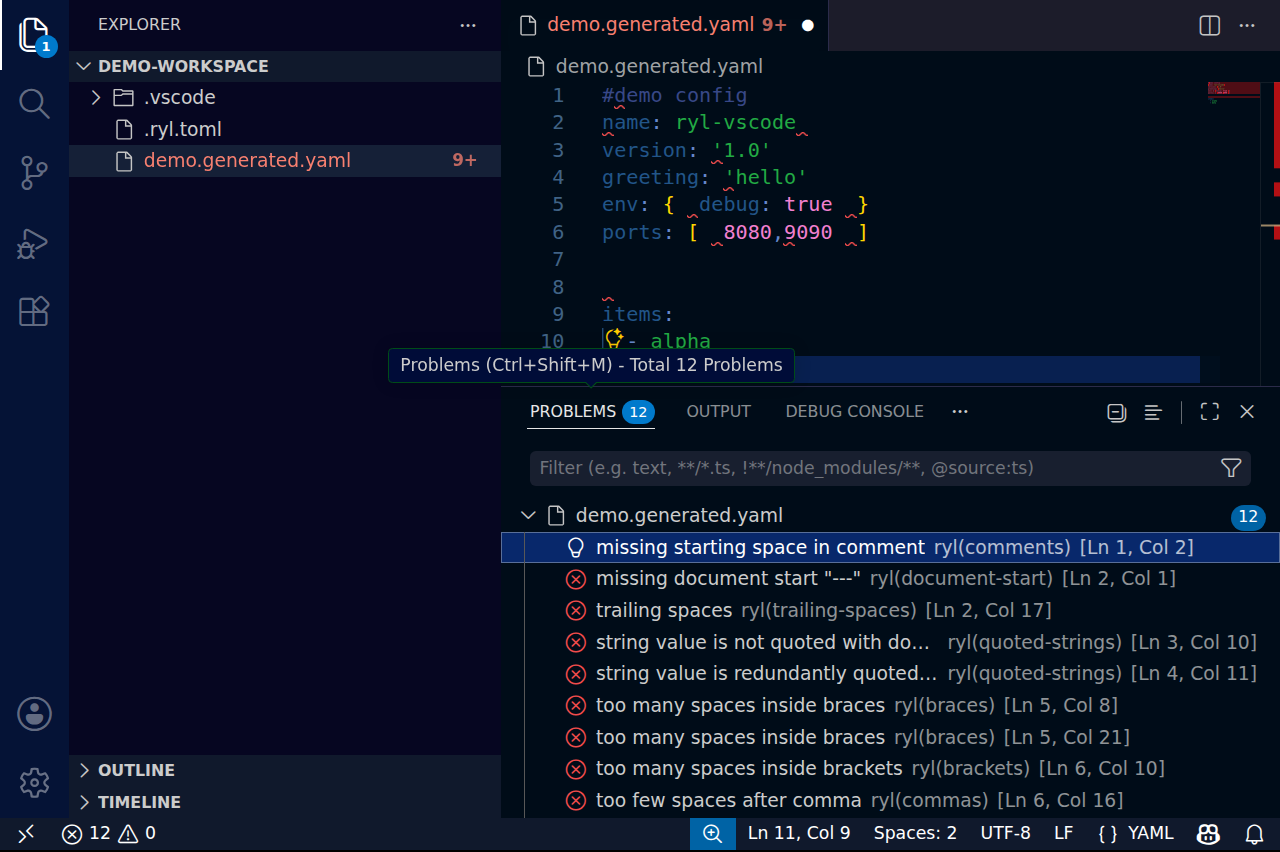
It surfaces the language-server features described above - live diagnostics, fix-all (and
per-rule fix-all), the disable-rule quick fixes, hover, and anchor/alias rename - and adds a
ryl.fixAll command and a fix-on-save option. To make ryl your YAML formatter and apply
safe fixes on save:
{
  "[yaml]": {
    "editor.defaultFormatter": "owenlamont.ryl",
    "editor.formatOnSave": true,
    "editor.codeActionsOnSave": {
      "source.fixAll.ryl": "explicit"
    }
  }
}
Like the CLI, it enables no rules until it discovers a config that turns some on. Source and issue tracker: owenlamont/ryl-vscode.
Notes
- Position encoding is negotiated at startup (UTF-8, UTF-16, or UTF-32); ryl supports all three and defaults to UTF-16 when the client states no preference, so columns line up correctly even for multi-byte and astral-plane characters.
- File watching covers both the standard config filenames anywhere in the workspace
(plus an explicit
configPath) and*.yaml/*.ymlsources, for clients that support dynamicdidChangeWatchedFilesregistration. A config change re-lints open documents; a source change out of the editor (agit checkout, another editor) resumes a long-polling workspace pull. Files pulled in via a config'sextends:are not individually watched, so re-open a document to refresh after editing those. A client without the capability simply picks up a change on the next edit or re-open. - Document sync is incremental — the editor sends only the edited range — but ryl re-lints the whole reconstructed document each time (it is fast enough that this is invisible).
- Disable-rule actions insert a
# ryl disable-linecomment on its own line. A diagnostic inside a block scalar gets no disable-line action (a#there would be scalar content, not a directive) — use the whole-file disable or a config-level ignore for those. - Rename targets YAML anchors/aliases only (not Markdown-embedded YAML), and is scoped
to the document the anchor lives in: a name reused across a
---/...boundary is a distinct anchor and is left untouched. - Push vs pull is chosen per client, never both. The server advertises the pull model
(
textDocument/diagnostic) and can push (textDocument/publishDiagnostics), but emits only one per document: if the client advertises pull support, the server relies on pull and does not push. The LSP spec does not say how the two models interact when a server supports both, and clients that keep them in separate diagnostic collections (VS Code viavscode-languageclient) would otherwise show every problem twice. A client that does not advertise pull (older editors) still gets pushes as before. After a config change, a pull client is asked to re-pull viaworkspace/diagnostic/refresh(if it advertisedrefreshSupport), since its gated-off push results would otherwise leave stale diagnostics on screen; a pull client without that capability re-pulls only on its own cadence. - Workspace pull diagnostics cover
*.yaml/*.ymlfiles under each workspace root (git-ignored files excluded); Markdown and files matched only by custom[files]globs are diagnosed when opened or pulled individually. The scan runs on a background thread (so editing, hover, and other requests stay responsive while it works) and lints files in parallel across CPU cores, in batches. A new pull supersedes any in-flight one, and a$/cancelRequest(and shutdown) stops it promptly: the directory walk is cancelled per entry and the lint pass per batch, so only an in-flight batch is not interrupted. - A workspace pull streams its results when the client offers a
partialResultToken(VS Code does): changed files go out as$/progressbatches while the scan is still running — the first batch immediately, then at most one every 50 ms — so a large repo fills the Problems panel progressively instead of in one jump at the end. Files that are stillunchangedare not streamed (they would tell the client nothing sooner) and come back in the response, which is otherwise empty: a streamed report is never repeated. - Workspace pulls are long-polled, so an idle workspace costs nothing. Every report
carries a
resultIdfingerprinting that file's diagnostics; a later pull that sends the same id back is answeredunchanged. When every file would beunchanged(a clean workspace included) the server does not answer at all — it holds the request open, as the LSP suggests for a workspace request that "can be long running", and responds only once an edit, a watched-file change, or a config change makes something differ. This matters becausevscode-languageclientre-issuesworkspace/diagnostica fixed two seconds after every response with no client-side knob, so answering an idle pull just books another full repo walk and lint two seconds later. A held request is still answered on$/cancelRequestand at shutdown, so the client never waits on it forever. - Disable-rule actions are offered for YAML documents only — in Markdown the diagnostic's line is a host-file line whose embedded YAML carries a prefix, so a raw comment insert would be unreliable; Markdown documents get the fix-all action (which is region-aware) instead.
- A missing config or one that enables no rules produces no diagnostics — the editor
stays quiet, matching ryl's "no rule is on unless you enable it" philosophy. A
malformed config (which would make
rylexit non-zero on the CLI) is reported once via awindow/showMessageso you know linting is off, rather than failing silently. - The server is compiled in by default. A minimal build without it (and without its
dependencies) is available via
cargo install ryl --no-default-features.